SWIM-TI Yellow Profile Implementation Guidance: AMQP Messaging Service Binding
Last updated: JULY 2nd, 2019
Contents
Introduction
This document provides implementation guidance for the AMQP Messaging Service Binding of the SWIM-TI Yellow Profile using a variety of Free and Open Source Software (FOSS) solutions. For each of the solutions analysed the satisfaction of the requirements that define the Service Binding is provided as well as the necessary configuration elements used to verify its satisfaction.
The proposed configuration options are aimed for minimum satisfaction of the requirements and should be understood as guidance of implementation, implementers should tailor their configuration to their needs.
In section 2 we cover a number of messaging brokers that support AMQP 1.0 messages and in section 3 we cover clients and libraries that can be used in producer or consumer side for sending and receiving AMQP 1.0 messages.
Brokers
RabbitMQ
RabbitMQ is a multi-protocol message broker that supports AMQP 0.9.1, AMQP 1.0, MQTT 3.1.1 and STOMP. In this section, we will analyse its capabilities as an AMQP 1.0 broker and the satisfaction of the AMQP Messaging Service Binding requirements of the Eurocontrol Specification for SWIM TI Yellow Profile.
Additional details on RabbitMQ and its configuration are available in its extensive documentation: https://www.rabbitmq.com/documentation.html
Service Interface Binding Requirements
The following table summarizes the Service Binding requirements of the AMQP Messaging Service Binding.
|
Requirement Title |
Requirement ID |
Conformance Level |
|
Data Compression |
SWIM-TIYP-0041 |
Optional |
|
AMQP Content Encoding Header |
SWIM-TIYP-0049 |
Optional |
|
AMQP Content Type Header |
SWIM-TIYP-0048 |
Mandatory Conditional |
|
AMQP Transport Security Authentication |
SWIM-TIYP-0037 |
Mandatory |
|
SASL |
SWIM-TIYP-0051 |
Mandatory |
|
AMQP over TLS |
SWIM-TIYP-0052 |
Mandatory |
|
AMQP |
SWIM-TIYP-0036 |
Mandatory |
|
TLS |
SWIM-TIYP-0008 |
Mandatory |
Data Compression
Satisfaction:
Complete
Verification:
Test
Configuration:
RabbitMQ acts as a pass-through for messages between producers and consumers, it respects the message body set by the producer, in particular for the case where the message body consists of binary string of the compressed message data.
No specific configuration is needed on the part of the broker.
Comment:
See section 2.1.1.1 for more details on how this compressed data can be set up on the producer side.
AMQP Content Encoding Header
Satisfaction:
Complete
Verification:
Test
Configuration:
RabbitMQ acts as a pass-through for messages between producers and consumers, it respects the Content-Encoding property set by the producer of the message. No specific configuration is needed.
Comment:
See section 2.1.1.2 for more details on how this property can be set up on the producer side.
AMQP Content Type Header
Satisfaction:
Complete
Verification:
Test
Configuration:
RabbitMQ acts as a pass-through for messages between producers and consumers, it respects the Content-Type property set by the producer of the message. No specific configuration is needed.
Comment:
See section 2.1.1.3 for more details on how this property can be set up on the producer side.
AMQP Transport Security Authentication
Satisfaction:
Complete
Verification:
Test
Configuration:
- TLS Server Authentication: To enable TLS server authentication the server must be configured with a X.509 certificate and private key and the certificate of the Root CA. This is done in the configuration file rabbitmq.conf , as shown in the following figure:

- TLS Mutual Authentication: To use TLS mutual authentication we have to allow the clients to authenticate themselves by means of a X.509 certificate. The following snippet from the rabbitmq.conf explains how this is achieved:
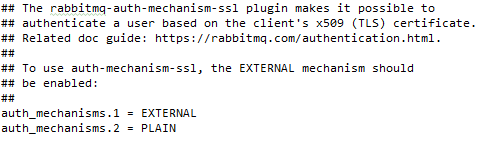
The auth-mechanism-ssl plugin is activated with the rabbitmq-plugins on the command line:

- SASL Anonymous: The broker accepts connections using SASL Anonymous mode (no SASL authentication). The broker assigns these anonymous users a default user which can be defined in the configuration file rabbitmq.conf . As shown in the following figure:
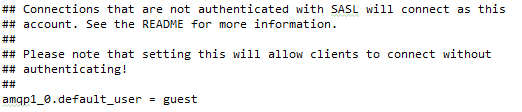
- SASL Plain: The broker accepts connections using SASL Plain mode (User/password authentication). The user will be authenticated against the database of users. The user can be created in design time using the JSON definitions file to load the users, or dynamically through the Management REST API. Below is a sample from the JSON definitions file that is loaded onto RabbitMQ.

Comment:
This covers the necessary configuration aspects from the broker point of view to satisfy the requirement. The configuration aspects from the point of view of the client are covered in section 2.
SASL
Satisfaction:
Complete
Verification:
Test
Configuration:
RabbitMQ accepts SASL client authentication as depicted in section 1.1.1.4.
Comment:
N/A.
AMQP over TLS
Satisfaction:
Complete
Verification:
Test
Configuration:
RabbitMQ accepts AMQP over TLS (AMQPS) connections over the standard port assigned by IANA (5671).
This port can be nonetheless configured in the configuration file rabbitmq.conf with the following line.

Comment:
N/A.
AMQP
Satisfaction:
Complete
Verification:
Test
Configuration:
RabbitMQ supports AMQP 1.0 protocol through a plugin. The plugin must be enabled as otherwise RabbitMQ defaults to AMQP 0.9.1. Enabling this plugging can be done with the following command on the command line before running the broker:

Comment:
N/A.
TLS
Satisfaction:
Complete
Verification:
Test
Configuration:
RabbitMQ supports TLS and allows to specify and restrict the version of TLS to be used through the configuration file rabbitmq.conf . The following line specifies the allowed versions of TLS:

Comment:
N/A.
ActiveMQ Artemis
Service Interface Binding Requirements
The following table summarizes the Service Binding requirements of the AMQP Messaging Service Binding.
|
Requirement Title |
Requirement ID |
Conformance Level |
|
Data Compression |
SWIM-TIYP-0041 |
Optional |
|
AMQP Content Encoding Header |
SWIM-TIYP-0049 |
Optional |
|
AMQP Content Type Header |
SWIM-TIYP-0048 |
Mandatory Conditional |
|
AMQP Transport Security Authentication |
SWIM-TIYP-0037 |
Mandatory |
|
SASL |
SWIM-TIYP-0051 |
Mandatory |
|
AMQP over TLS |
SWIM-TIYP-0052 |
Mandatory |
|
AMQP |
SWIM-TIYP-0036 |
Mandatory |
|
TLS |
SWIM-TIYP-0008 |
Mandatory |
Data Compression
Satisfaction:
Complete
Verification:
Test
Configuration:
ActiveMQ Artemis acts as a pass-through for messages between producers and consumers, it respects the message body set by the producer, in particular for the case where the message body consists of binary string of the compressed message data.
No specific configuration is needed on the part of the broker.
Comment:
See section 2.1.1.1 for more details on how this compressed data can be set up on the producer side.
AMQP Content Encoding Header
Satisfaction:
Complete
Verification:
Test
Configuration:
ActiveMQ Artemis acts as a pass-through for messages between producers and consumers, it respects the Content-Encoding property set by the producer of the message. No specific configuration is needed.
Comment:
See section 2.1.1.2 for more details on how this property can be set up on the producer side.
AMQP Content Type Header
Satisfaction:
Complete
Verification:
Test
Configuration:
ActiveMQ Artemis acts as a pass-through for messages between producers and consumers, it respects the Content-Type property set by the producer of the message. No specific configuration is needed.
Comment:
See section 2.1.1.3 for more details on how this property can be set up on the producer side.
AMQP Transport Security Authentication
Satisfaction:
Complete
Verification:
Test
Configuration:
-
TLS Server Authentication: To enable TLS server authentication the broker has to be configured with the private key and a trust store. This is done in the
acceptors
section of the
broker.xml
configuration file, the relevant parameters to pass in the definition of the
acceptor
URL are:
- sslEnabled=true
- keyStorePath=/path/to/broker_keystore.jks
- keyStorePassword=securepassword
- trustStorePath=/path/to/broker_trust_store.jks
- trustStorePassword=securepassword

-
TLS Mutual Authentication: To use TLS mutual authentication we have to allow the clients to authenticate themselves by means of a X.509 certificate, on top of setting the TLS Server Authentication as in the previous bullet point. This requires multiple configuration files to be properly set up and aligned:
- login.config: Defines the JAAS plugins used by the broker to perform client authentication. In particular, we need to define the use of TextFileCertificateLoginModule as shown in the following configuration snippet:

This configuration file refers to two other files "cert-users.properties" and "cert-roles.properties".
- cert-users.properties: Defines the users that are recognized by the broker and must contain an entry for the client's X.509 Distinguished Name, as shown in the following image:

Alternatively, the broker can be integrated with an existing LDAP infrastructure using JAAS LDAPLoginModule (see, https://activemq.apache.org/components/artemis/documentation/1.2.0/security.html ).
- cert-roles.properties: Assigns each user to one or more roles with their associated permissions. The following example assigns the " certconsumer" user defined previously with a "cert" role.

-
- bootstrap.xml: Defines various configuration aspects of the broker, including the JAAS security configuration to be used (defined in the previous bullet point). We must point to the security configuration defined in login.config , the following snippet illustrates this by pointing to the "activemq" domain defined previously.
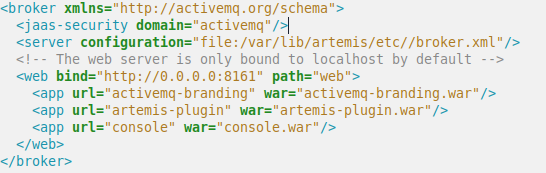
- SASL Anonymous: The broker accepts connections using SASL Anonymous mode. We have to enable the GuestLoginModule in the login.config configuration file, assigning a default user and role to unauthenticated users. As shown in the following snippet.
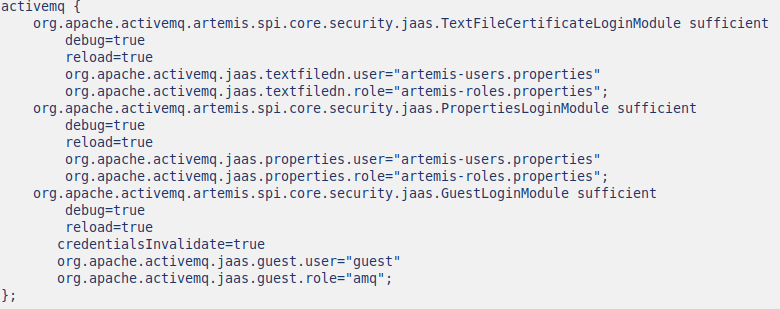
- SASL Plain: The broker accepts connections using SASL Plain mode (User/password authentication). To do so we have to enable the PropertiesLoginModule in the login.config configuration file.
In the example above the user will be authenticated against the database of users defined by org.apache.activemq.jaas.properties.user (i.e. "artemis-users.properties"). Which contains the credentials in the following format:
Username = password
The password itself can be stored in an unrecoverable manner using hashes.
Below is a sample from the "artemis-users.properties" file.

Comment:
Additional documentation on the configuration of the JAAS plugins can be found in Apache ActiveMQ Artemis documentation: https://activemq.apache.org/components/artemis/documentation/1.2.0/security.html
SASL
Satisfaction:
Complete
Verification:
Test
Configuration:
ActiveMQ Artemis accepts SASL client authentication as depicted in section 1.2.1.4.
Comment:
N/A.
AMQP over TLS
Satisfaction:
Complete
Verification:
Test
Configuration:
ActiveMQ Artemis accepts AMQP over TLS (AMQPS) connections.
The use of AMQPS is configured in the acceptors section of the broker.xml configuration file. As shown in the following configuration snippet:

The relevant parameters of the configuration are:
- sslEnabled=true
- protocols=AMQP
Which establish the use of TLS and AMQP 1.0 for said acceptor. And:
- keyStorePath=/path/to/broker_private_key.jks
- keyStorePassword=securepassword
- trustStorePath=/path/to/broker_trust_store.jks
- trustStorePassword=securepassword
Which establish the private key, trust store of the broker and its passwords.
Comment:
N/A.
AMQP
Satisfaction:
Complete
Verification:
Test
Configuration:
ActiveMQ Artemis natively supports AMQP 1.0 protocol. The use of the protocol is enabled in the acceptors section of the broker.xml configuration file, as shown in section 1.2.1.6.
The relevant parameter of the configuration is:
- protocols=AMQP
Comment:
N/A.
TLS
Satisfaction:
Complete
Verification:
Test
Configuration:
ActiveMQ Artemis supports TLS and allows to specify and restrict the version of TLS to be used. This is done with the enabledProtocol parameter in the acceptors section of the broker.xml configuration file. As shown in the following configuration snippet:

The relevant parameters of the configuration are:
- sslEnabled=true
- enabledProtocol=TLS1.2
Comment:
N/A.
Clients
Apache Qpid Proton
Apache Qpid Proton provides a low-level implementation of AMQP 1.0 in the C programming language and multiple higher-level reactive APIs on various mainstream programming languages (Java, C++ and Python). The following demonstrates the configuration of Qpid Proton using its Python API [1] but Qpid Proton's API is quite consistent across the different languages.
Service Binding Requirements
|
Requirement Title |
Requirement ID |
Conformance Level |
|
Data Compression |
SWIM-TIYP-0041 |
Optional |
|
AMQP Content Encoding Header |
SWIM-TIYP-0049 |
Optional |
|
AMQP Content Type Header |
SWIM-TIYP-0048 |
Mandatory Conditional |
|
AMQP Transport Security Authentication |
SWIM-TIYP-0037 |
Mandatory |
|
SASL |
SWIM-TIYP-0051 |
Mandatory |
|
AMQP over TLS |
SWIM-TIYP-0052 |
Mandatory |
|
AMQP |
SWIM-TIYP-0036 |
Mandatory |
|
TLS |
SWIM-TIYP-0008 |
Mandatory |
Data Compression
Satisfaction:
Complete
Verification:
Test
Configuration:
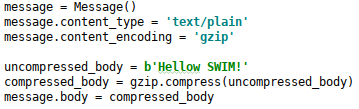
AMQP 1.0 and Qpid Proton are agnostic of the payload and do not require any special configuration to work with data compression. A compressed payload is treated as a binary string. The following example illustrates how a string of text is compressed into binary using Gzip, sent using Qpid Proton to the RabbitMQ broker which in turn delivers it to the subscribed consumers.
- Producer: On the producer side we build a small sample message whose body is a Gzip compressed string:
- Consumer: On the consumer side the message arrives compressed and can be decompressed using Gzip. The following snippet will leave a log trace of the arrival of the message and the message elements.

Which produces the following log trace on the consumer side:

Comment:
The documentation of the Message class can be found here: https://qpid.apache.org/releases/qpid-proton-0.27.1/proton/python/api/proton._message.Message-class.html
AMQP Content Encoding Header
Satisfaction:
Complete
Verification:
Test
Configuration:
Qpid Proton allows to set the AMQP 1.0 properties of a message in a straightforward manner, the following example shows how to do so for the Content-Encoding and Content-type properties.

Comment:
See further details of the Message class API.
AMQP Content Type Header
Satisfaction:
Complete
Verification:
Test
Configuration:
Qpid Proton allows to set the AMQP 1.0 properties of a message in a straightforward manner, the following example shows how to do so for the Content-Encoding and Content-type properties.

Comment:
See further details of the Message class API.
AMQP Transport Security Authentication
Satisfaction:
Complete
Verification:
Test
Configuration:
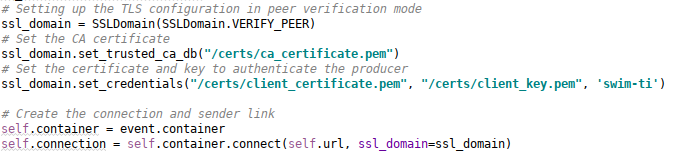
- TLS Server Authentication: To enable TLS server authentication on Qpid Proton the client must configure the root CA certificate in order to verify the public certificate presented by the server. This can be done in the following manner:

- TLS Mutual Authentication: To use TLS mutual authentication we have to configure not only the root CA certificate to authenticate the server (see point above) but also configure the client's certificate and private key that he will use to authenticate himself. The following snippet shows how this can be done in Qpid Proton.
- SASL Anonymous: From the point of view of the client configuring a SASL Anonymous authentication amounts to not using SASL. The following snippet shows a connection configured without SASL.

- SASL Plain: Qpid Proton allows the use of SASL PLAIN authentication mechanism. Upon opening the connection the client simply has to provide its credentials in the following way:

Comment:
The documentation of the SSLDomain class is available at: https://qpid.apache.org/releases/qpid-proton-0.27.1/proton/python/api/proton._transport.SSLDomain-class.html
The documentation of the Container.connect method is available at: https://qpid.apache.org/releases/qpid-proton-0.27.1/proton/python/api/proton._reactor.Container-class.html#connect
SASL
Satisfaction:
Complete
Verification:
Test
Configuration:
Qpid Proton supports SASL authentication but a few dependencies are required, as explained in its documentation:
https://github.com/apache/qpid-proton/blob/master/INSTALL.md
Section 2.1.1.4 provides further details on the configuration of SASL credentials.
Comment:
N/A.
AMQP over TLS
Satisfaction:
Complete
Verification:
Test
Configuration:
Qpid Proton allows to establish AMQP over TLS connections, section 2.1.1.4 provides the configuration details from the point of view of the client.
Comment:
N/A.
AMQP
Satisfaction:
Complete
Verification:
Test
Configuration:
Qpid Proton is a library of AMQP 1.0. No specific configuration is needed.
Comment:
N/A.
TLS
Satisfaction:
Complete
Verification:
Test
Configuration:
Qpid Proton supports establishing TLS connections but a few dependencies are required, as explained in its documentation:
https://github.com/apache/qpid-proton/blob/master/INSTALL.md
Comment:
N/A.
Rhea
Rhea provides a reactive AMQP 1.0 library for Javascript (Node.js). The following section matches its capabilities against the requirements of the AMQP Messaging Service Binding.
Additional documentation and working examples can be found on Rhea's GitHub repository: https://github.com/amqp/rhea
Service Binding Requirements
Data Compression
Satisfaction:
Complete
Verification:
Test
Configuration:
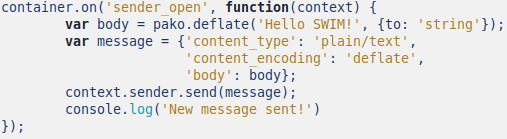
AMQP 1.0 and Rhea are agnostic of the payload and do not require any special configuration to work with data compression. A compressed payload is treated as a binary string. The following example illustrates how a string of text is compressed into binary using Gzip, sent using Rhea to the RabbitMQ broker which in turn delivers it to the subscribed consumers.
- Producer: On the producer side we build a small sample message whose body is a deflate compressed string:
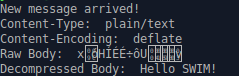
- Consumer: On the consumer side the message arrives compressed and can be decompressed using the reverse operation of deflate ( inflate ). The following snippet will leave a log trace of the arrival of the message and the message elements.

Which produces the following log trace on the consumer side when a message arrives:
Comment:
AMQP Content Encoding Header
Satisfaction:
Complete
Verification:
Test
Configuration:
Rhea allows to define an AMQP 1.0 message using JavaScript Object Notation (JSON), the following example shows how to do so for a small sample message containing Content-Encoding and Content-type properties and some payload in the body.

Comment:
N/A.
AMQP Content Type Header
Satisfaction:
Complete
Verification:
Test
Configuration:
Rhea allows to define an AMQP 1.0 message using JavaScript Object Notation (JSON), the following example shows how to do so for a small sample message containing Content-Encoding and Content-type properties and some payload in the body.

Comment:
N/A.
AMQP Transport Security Authentication
Satisfaction:
Complete
Verification:
Test
Configuration:
- TLS Server Authentication: To enable TLS server authentication using Rhea the client must configure the root CA certificate in order to verify the public certificate presented by the server. This can be done in the following manner:

- TLS Mutual Authentication: To use TLS mutual authentication we have to configure not only the root CA certificate to authenticate the server (see point above) but also configure the client's certificate and private key that he will use to authenticate himself. The following snippet illustrates this configuration.

- SASL Anonymous: To configure a SASL Anonymous authentication with Rhea it suffices to not specify a password, the username can be any string as it will be mapped by the broker to its default anonymous user. The following snippet shows a connection configured with SASL Anonymous.

- SASL Plain: To configure a SASL Plain authentication with Rhea we simply provide the username and password of the client to authenticate. The following snippet shows a connection configured with SASL Plain.

Comment:
N/A.
SASL
Satisfaction:
Complete
Verification:
Test
Configuration:
Rhea allows to perform SASL Anonymous and SASL PLAIN authentication, section 3.2.1.4 provides detailed configuration snippets for both cases.
Comment:
N/A.
AMQP over TLS
Satisfaction:
Complete
Verification:
Test
Configuration:
Rhea allows to establish AMQP over TLS connections, section 3.2.1.4 provides the configuration details from the point of view of the client.
Comment:
N/A.
AMQP
Satisfaction:
Complete
Verification:
Test
Configuration:
Rhea is a library of AMQP 1.0. No specific configuration is needed.
Comment:
N/A.
TLS
Satisfaction:
Complete
Verification:
Test
Configuration:
Rhea supports establishing TLS sessions, section 3.2.1.4 provides the configuration details from the point of view of the client.
Comment:
N/A.
References
- Eurocontrol Specification for SWIM Technical Infrastructure Yellow Profile , EUROCONTROL
- RabbitMQ Documentation , Pivotal
- ActiveMQ Artemis Documentation , Apache
- Qpid Proton Documentation , Apache
- Rhea Documentation